What to order
Turn your menu into ingredient demand.
Planned dishes, recipes and guest count establish which products you need.

PURCHASING AND KITCHEN PLANNING FOR HOTELS
Atlas calculates ingredient demand from menus and recipes, then brings it together with stock and supplier information. Know what to order, when, how much and from whom.
Your team controls planning and purchasing.
HOW ATLAS WORKS
Plan the menu, compare demand with stock, and use each record to review the next service.
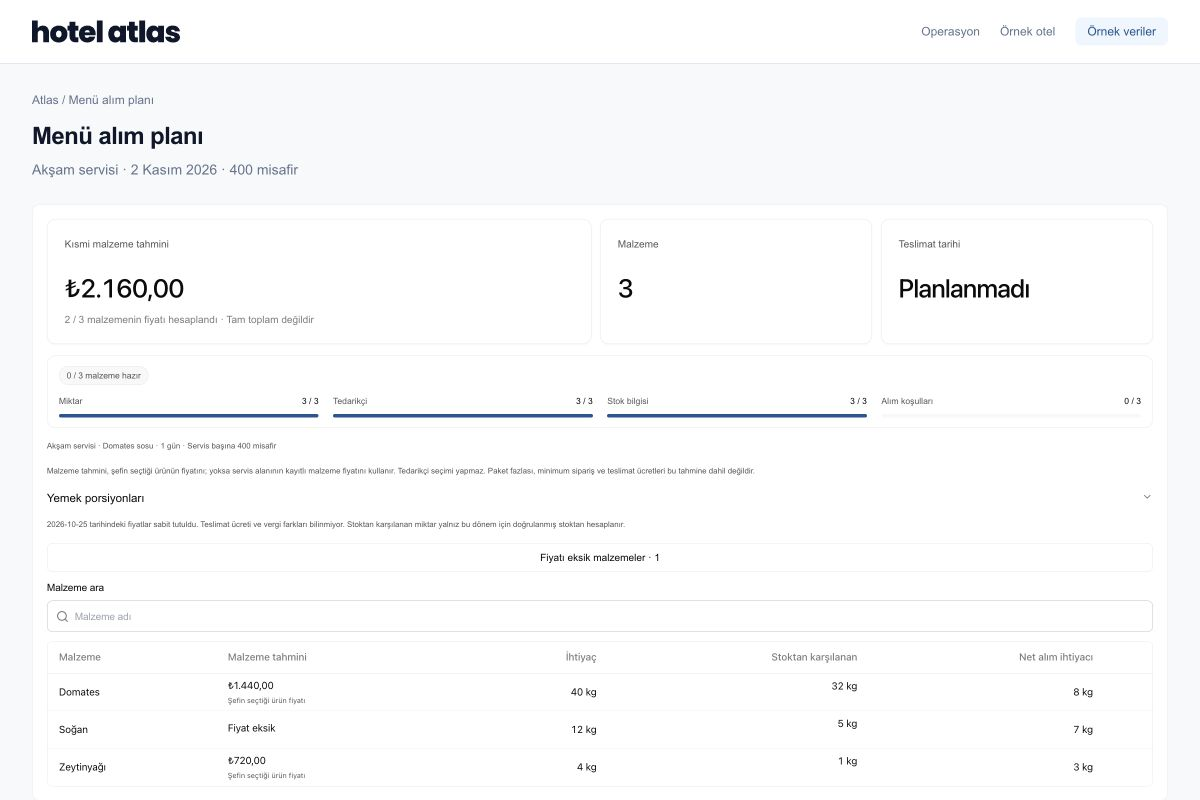
40 kg of tomato needed, 32 kg in stock: the team reviews the remaining 8 kg for purchasing.
WHAT CHANGES WITH ATLAS?
Review purchasing decisions in one plan, with menus, stock and supplier information together.
Turn your menu into ingredient demand.
Planned dishes, recipes and guest count establish which products you need.
Plan purchases around the service calendar.
Review required dates alongside recorded supplier delivery terms. Confirm missing delivery details before ordering.
Compare demand with available stock.
See recipe quantities and stock together. Review the remaining need with pack sizes and purchasing terms.
See the basis for choosing a supplier.
Review product matches, recorded prices, pack information and delivery terms to select a suitable supplier.
Your team confirms the plan. Missing price and supplier information is completed before a decision.
DAILY QUESTIONS IN A HOTEL KITCHEN
Guest numbers, menus, available ingredients and preparation quantities change together. Atlas brings those decisions into a workflow your team can follow.
The chef needs to reconsider the menu and portion basis. Connect service size with the recipe and see how the change affects ingredient demand.
Stock quantities, usable ingredients and supplier terms need to be reviewed together. Let purchasing trace the source of demand in the same plan.
The dish and service behind leftovers matter alongside their weight. Verify the record and review the next preparation plan using measurement and your team’s experience.
01 / Menu & Production
Behind a dish list are ingredients, portions, service dates and prices. Atlas helps your chef review those details in the same menu plan.
Keep ingredient quantities alongside the number of portions the recipe produces. Review preparation and cost calculations using the same information.
Review expected guests, meal periods, fixed dishes and menu rules. Your chef confirms the draft using the kitchen’s operating requirements.
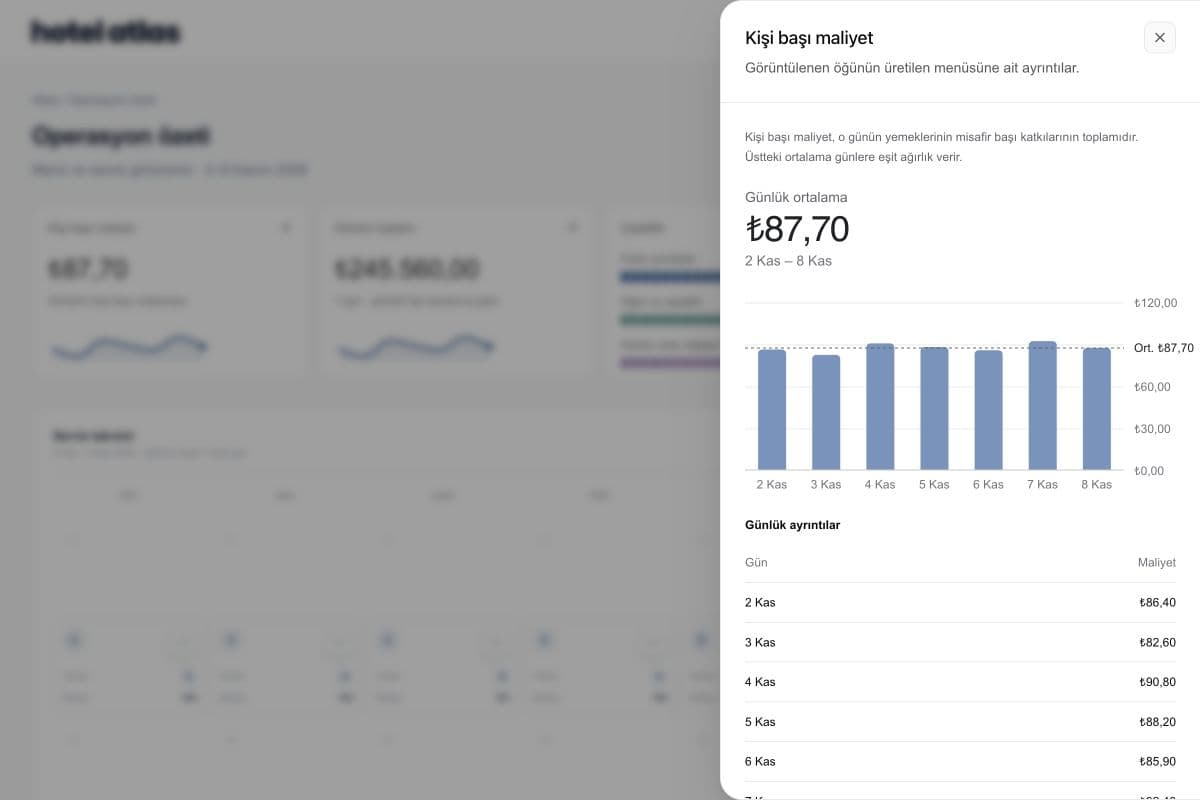
See per-person cost alongside the dish mix. Check what is missing before treating an incomplete estimate as a fully priced menu.
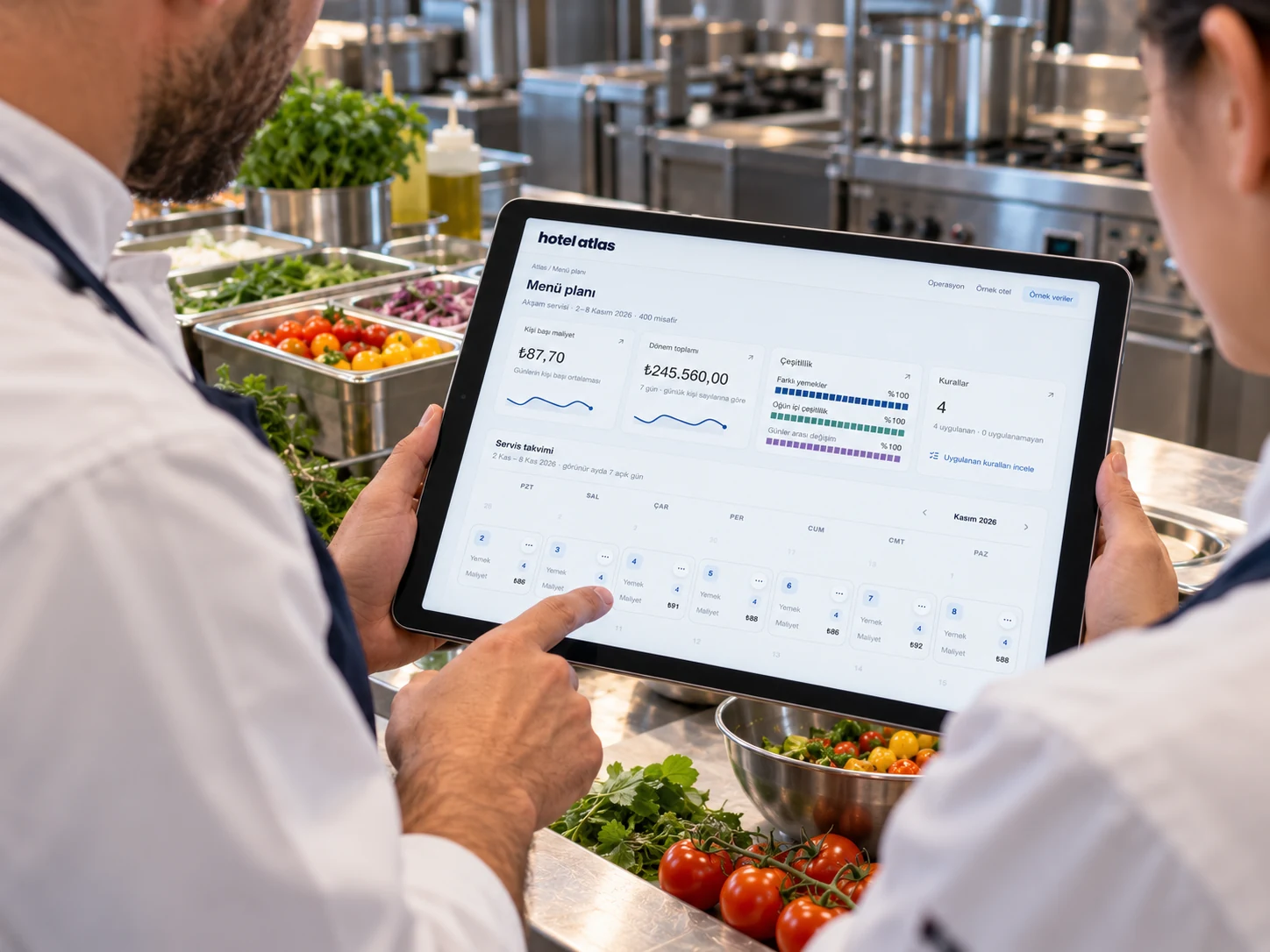
The service plan reviewed by the chef becomes the starting point for stock and purchasing demand.
02 / Stock & Purchasing
Which dishes create demand for an ingredient? How much can available stock cover? Atlas helps you review both sides before making a purchasing decision.
Review service size, recipe quantities and the dishes using an ingredient together. Start with a total and follow its underlying calculation.
Review current quantity, units and expiry dates. Clarify outdated stock information or records needing review before deciding what to buy.
Assess net demand alongside the product, pack size, price, order minimums and delivery terms. Connect requests with approvals and receiving.
A calculated shortfall is an input to purchasing review. Orders and approvals remain with your team.
03 / Waste Tracking
A total weight cannot answer every question. Which dish, which service, which image and which weight record? Atlas helps your team review the evidence together.
Bring tray, image and weight information together through a suitable camera and platform-scale setup. Review the station layout against your kitchen’s physical workflow.
Check the dish match, image and weight source. Examine the basis of the record without treating recognition confidence as a guarantee of accuracy.
Review verified food loss in its dish and service context. Consider the chef’s observations and operating conditions when adjusting preparation and menus.
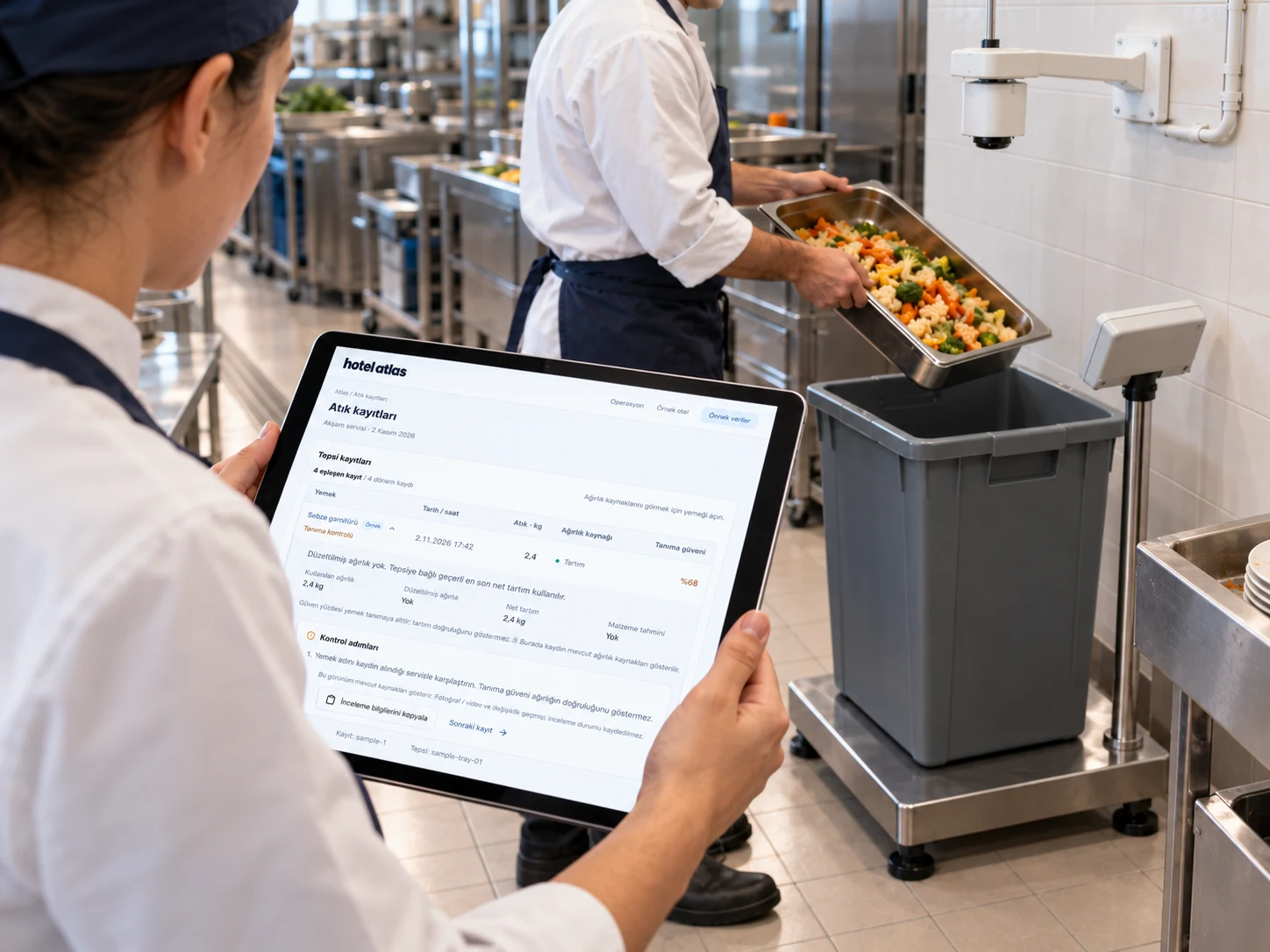
Measurement is followed by team review. The aim is a better-informed preparation decision for the next service.
04 / Management & Profitability
For F&B and management, costs, ingredient shortages and pending reviews need context. Atlas helps you explore those questions using the kitchen’s own information.
Review per-person cost, the dish mix and price coverage together. Consider how a missing price affects the total before making a decision.
Use Atlas Live to explore daily questions about menus, stock and cost. Review the information supporting an answer and the next step to investigate.
Clarify chef, stock, purchasing and management responsibilities in the same workflow. Decisions needing review or approval move forward with the relevant team.
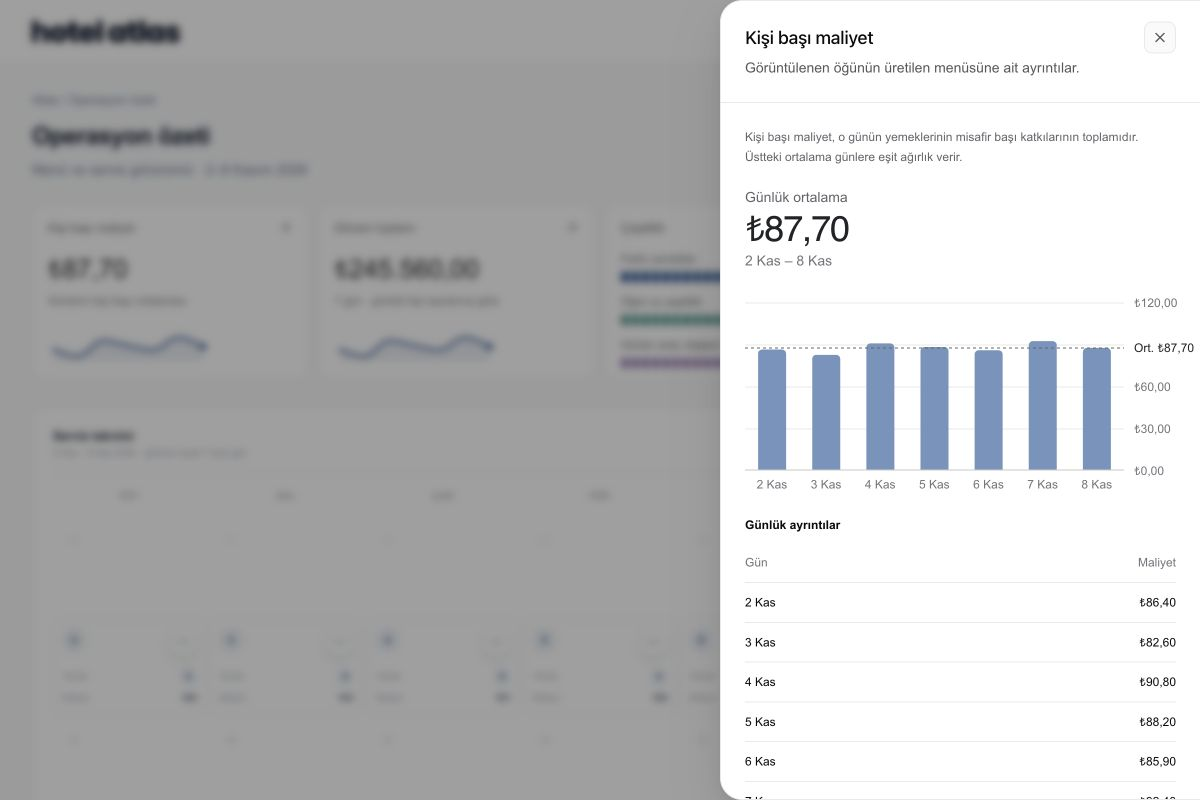
Shared context helps teams examine the same question using the same underlying information.
FROM THE CHEF TO MANAGEMENT
Everyone can focus on their work. The basis for menus, stock and costs stays clear between teams.
AROUND ONE SERVICE
Use Atlas across planning, purchasing, record review and the next service. Each step provides context for the team’s next decision.
The chef reviews guest count, menus, recipes and preparation quantities together.
Stock and purchasing teams review availability, net demand, price and delivery terms.
The team checks images, dish matches and weight records to establish the context of food loss.
The chef and management review the records alongside their operating experience before revisiting preparation.
Workflow scope, responsibilities and review points are agreed around your hotel’s operating requirements.
START WITH YOUR EXISTING INFORMATION
Begin with the information needed for one service. Review files, connections and access requirements together without waiting to replace every system at once.
Review existing recipes, menus and stock sheets. Define import, matching and Excel, CSV or PDF export scope in supported workspaces.
Review the systems holding guest, occupancy and stock information. Agree data fields, matching and freshness within setup for hotel-system connections such as Elektraweb.
Consider using Atlas tools in supported chat environments with appropriate scope and permissions. Define accessible data and available actions before connecting.
START IN YOUR OWN KITCHEN
Begin with your current setup. Together, we will define the first workflow, data requirements and review points.
Review your example menu, recipes, guest count and any stock records with us.
Check portions, ingredient needs and price coverage with your team.
Clarify chef, stock and purchasing responsibilities, then expand through suitable workflows.
TAKE A CLOSER LOOK
Follow planning, demand, purchasing and record review.
02 / Example serviceFollow recipes, stock and net purchasing needs for a sample 400-guest service.
03 / Existing dataReview files, exports and connections to assess for your hotel.
Start with one recipe and one service. Together, we will find the right scope for your hotel’s workflow.
Hotel food and beverage, kitchen, warehouse and purchasing teams. Atlas helps your teams work from the same needs plan and records, from menu planning through service.
An example menu, a few recipes and the number of guests you expect are a good starting point. If you have stock records, we can use them to walk through your hotel’s workflow too.
Yes. You can start with menus, recipes, stock and purchasing. For waste tracking with images and weight, we will plan the overhead camera and full-size platform scale station around your kitchen.
Atlas helps you create menu proposals and work with operational data. Your team reviews menu and purchasing decisions; missing prices and uncertain matches remain visible.
We will review your PMS, stock and purchasing systems together in the demo. We will agree on suitable data sources, transfer methods and connection scope around your hotel’s current setup.
During the demo, we can review your workflows, existing data and any camera or scale needs. We can then clarify the implementation steps and proposal for that scope.
SEE ATLAS IN YOUR OWN OPERATION
Bring your menu, guest count and team priorities. See where Atlas fits your hotel in a live walkthrough.
A live walkthrough with your menu and purchasing workflow