Stock team
Keeps count, quantity, expiry and receiving records current.
FROM DEMAND TO DELIVERY
Compare menu demand with available stock. Follow shortages, supplier prices and receiving in one workflow.
A CLOSER LOOK AT THE PRODUCT
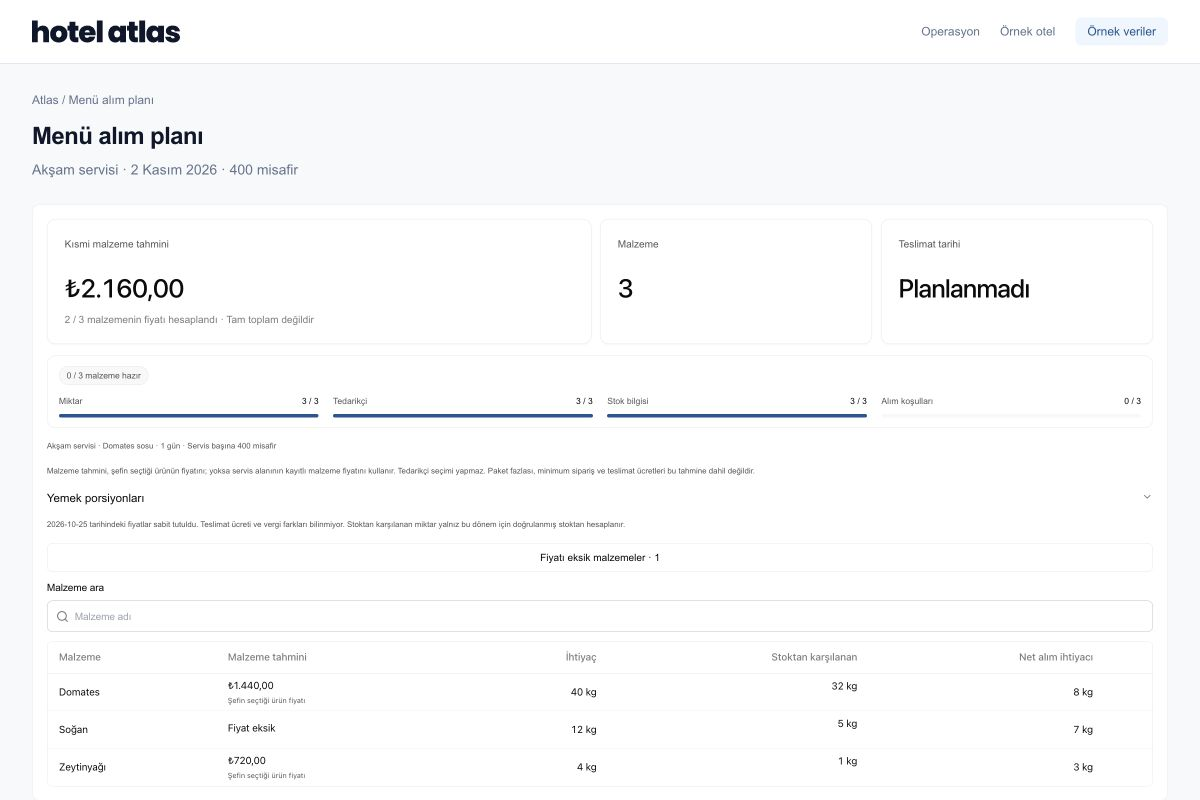
Recipe demand, stock coverage, price coverage and delivery status share one plan. Trace a total back to its ingredients.
Review quantities and upcoming expiry dates before planning new purchases.
Compare recipe-specific demand and expected covers with stock to clarify purchasing needs.
Keep price review, requests, approvals and receiving under your team’s control.
THE WORKFLOW, STEP BY STEP
Before a new purchasing request, review what is needed and what is available to use.
Service size and dish recipes form the basis of ingredient demand. Review which dish and service generated each requirement.
See recorded quantities, count information and expiry dates. Assess how much of the planned service available products can cover.
Review supplier products, price sources, pack quantities and delivery conditions. Clarify missing information before deciding.
Follow requests, team review, approval and receiving. Compare delivered quantities and records with the planned requirement.
EXPLORE AN EXAMPLE
Net purchasing need is the part of recipe demand that stock cannot cover. Change the quantities below to see how the example changes.
EXAMPLE CALCULATION · TOMATO
40 kg demand − 32 kg stock. Pack size, order minimums and delivery conditions are outside this example.
GETTING STARTED AT YOUR HOTEL
Start by reviewing your menu, current stock information and a few supplier products together.
Teams sharing the workflow
Keeps count, quantity, expiry and receiving records current.
Reviews products, prices, delivery and order conditions.
Review menu demand and approval decisions within their own responsibilities.
BEFORE YOU BEGIN
Let’s define the scope around your hotel’s workflow.
We can agree a starting scope together. Net purchasing need cannot be considered final while stock is unknown. Counts and opening quantities directly affect plan accuracy.
Not always. Pack size, order minimums, delivery dates and storage conditions affect the order. Net need does not become an automatic order before these conditions are reviewed.
Price coverage and the basis of the available record form part of purchasing review. Your team assesses missing, outdated or incomparable price information.
Purchasing and approval decisions remain with your team. Demand calculations, supplier review and receiving connect within the workflow; the active steps depend on your operation.
Waste Tracking
Review where prepared food becomes waste and use records when evaluating the next plan.
SEE ATLAS IN YOUR OWN SERVICE
Start with a sample menu, expected guest count and your team’s priorities.
Request a demo